Why a Static PDF Is NOT a Digital Menu
Many restaurant operators in India attempt to launch digital ordering by taking a photo of their existing printed menu, saving it as a 12MB PDF on Google Drive, and printing a generic QR code. When hungry guests scan this code on their mobile devices, they are greeted by an awful user experience: waiting through slow cellular downloads, pinching and zooming tiny text, squinting to read descriptions, and still needing to shout across the room to wave down a server to place their order.
A true digital menu is interactive, responsive, lightning-fast, and deeply integrated into your kitchen workflow. Follow this step-by-step masterclass to design, build, and deploy an appetizing digital menu that drives sales.

Step 1: Structure Your Menu Categories for Mobile Flow
Desktop and paper menus allow wide visual sweeps, but mobile smartphone users scroll vertically. Cognitive fatigue sets in quickly if a diner must scroll past 40 disorganized appetizers.
- Limit Top-Level Categories to 6–8 Groups: For example: Chef's Specials, Starters, Tandoor, Main Curries, Breads & Rice, Desserts, Mocktails & Beverages.
- Place High-Margin Categories First: Feature signature appetizers and specialty beverages near the top. Guests are hungriest and most receptive to impulse purchases during their first 90 seconds of browsing.
- Use Recognizable Dietary Badges: Clearly mark items with authentic Indian dietary indicators: Green dot for Pure Veg, Red dot for Non-Veg, and distinctive icons for Jain, Vegan, and Chef's Signature.
Step 2: Capture High-Converting Food Photography on Your Smartphone
You do not need an expensive commercial photography crew to build a mouthwatering digital menu. Modern smartphones with portrait mode produce stunning results if you follow these rules:
- Leverage Natural Daylight: Shoot next to a large window between 10:00 AM and 3:00 PM. Avoid harsh overhead restaurant spotlights or yellow incandescent bulbs that distort natural food colors.
- Shoot at a 45-Degree Angle: The 45-degree angle mimics the exact perspective of a diner seated at the table admiring their food.
- Style with Fresh Garnishes: A sprinkle of fresh chopped coriander, a lime wedge, or a drizzle of virgin olive oil adds vivid texture and freshness.
- Maintain Consistent Aspect Ratios: Standardize on 16:9 or 4:3 landscape framing so your menu grid appears clean and uniform.
Dishes featuring high-resolution photos experience up to 32% higher order volume than identical items listed with text alone. Highlighting 3 signature desserts with photos can lift your dessert revenue by over 40%.
Step 3: Write Appetizing, Sensory Descriptions
Generic descriptions like "Paneer butter masala with spices" do little to stimulate appetite. Great menu copy leverages sensory adjectives that convey texture, cooking method, and origin:
- Before: "Crispy chicken wings with spicy dip."
- After: "Double-fried crisp wings tossed in fiery Bhut Jolokia honey glaze, served with cool house garlic ranch dip."
- Before: "Dal Makhani."
- After: "Black lentils slow-simmered for 16 hours over charcoal, finished with churned white butter and aromatic roasted fenugreek."
Step 4: Configure Smart Modifiers and Combo Upsells
The true power of ScanDine's digital menu lies in its automated upselling engine. For every core dish, configure intuitive modifier choices:
- Mandatory Choices: e.g., Choice of Spice Level (Mild / Medium / Spicy) or Beverage Temperature (Hot / Iced).
- Optional High-Margin Add-Ons: e.g., "Add Extra Burrata Cheese (+₹80)", "Add Garlic Butter Naan (+₹65)", or "Upgrade to Large Fries (+₹50)".
- Curated Combos: Prompt guests ordering a burger or sandwich with a 1-tap add-on for a paired signature shake or craft beer.
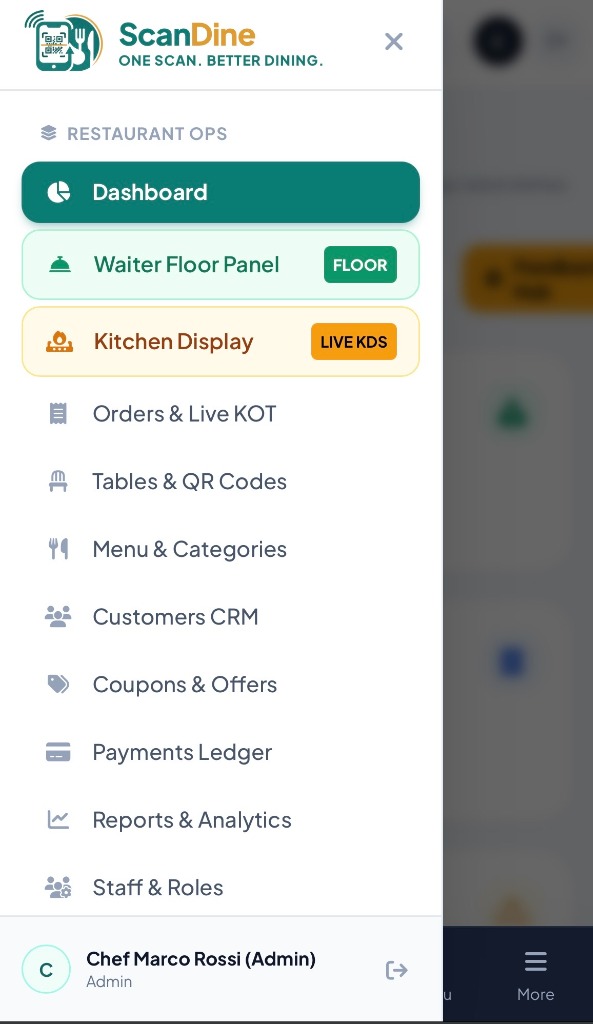
Step 5: Generate Branded Table QR Codes & Deploy Hardware
Once your menu is configured in the ScanDine admin console:
- Click Generate Table QR Codes to automatically create unique, high-resolution QR vectors for Table 1 through Table 30.
- Download the print-ready PDF files formatted with your restaurant's logo and primary brand colors.
- Order durable acrylic table tents or laser-engraved wooden blocks from a local print shop.
- Place them prominently on every table and train your service team to invite guests to scan and browse upon seating.
Start Your Setup Today
With ScanDine's intuitive dashboard, setting up your restaurant's full digital menu takes less than an afternoon. Book a free 1-on-1 walkthrough and watch our onboarding specialists configure your live menu on the spot.