The Fast-Track to Modern Dining
Many restaurant operators in India hesitate to adopt modern dining technology because they fear prolonged software installations, expensive hardware procurement, and weeks of disruptive employee training. In reality, launching a modern cloud-native QR ordering system requires zero downtime, no bulky on-premise servers, and no complex network wiring.
With ScanDine, you can transform your dining room from traditional paper menus to a fully synchronized digital ordering ecosystem in less than 24 hours. Whether you run a high-energy cafe in Koramangala, Bengaluru, a rooftop lounge in Pune, or a multi-cuisine family diner in Mumbai, this practical, hour-by-hour launch blueprint guides you through every step.

You do not need to pause your restaurant's operations for a single minute. Your existing billing POS and paper menus can continue functioning normally while you configure ScanDine in the background.
The 24-Hour Implementation Timeline
| Timeline | Key Milestone | Actionable Steps |
|---|---|---|
| Hours 1–4 | Menu Digitization | Upload dish names, prices, dietary tags (Veg/Non-Veg/Jain), and photo imagery into ScanDine Admin. |
| Hours 5–8 | Table Layout & QR Generation | Map your floor tables (e.g. Tables 1–25) and generate branded QR codes with your restaurant logo. |
| Hours 9–14 | Standee Printing & Mounting | Send print-ready PDFs to a local printer for acrylic tent cards, wooden blocks, or durable table stickers. |
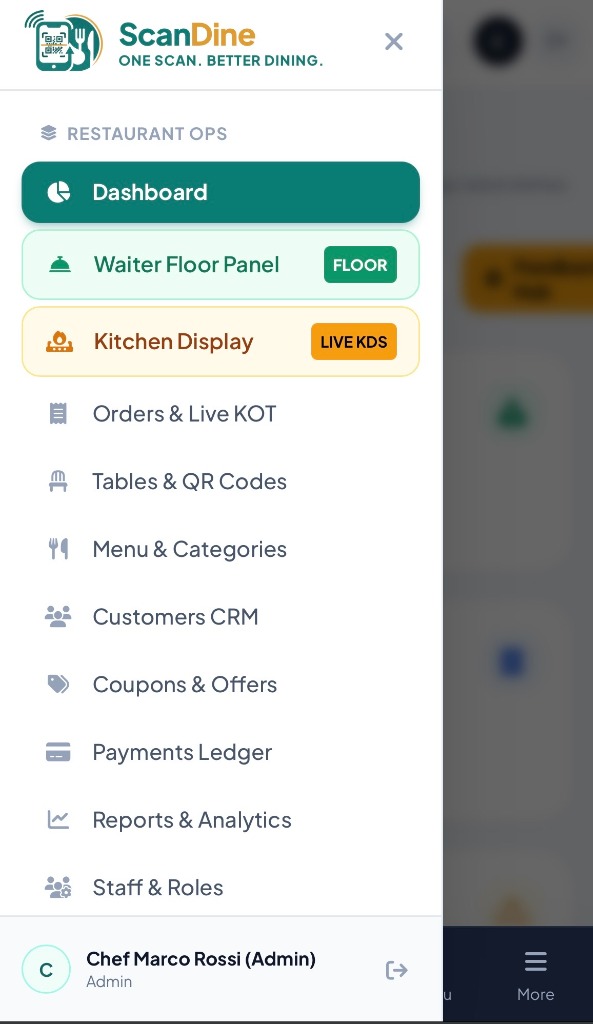
| Hours 15–18 | Kitchen KDS Screen Setup | Open the ScanDine Kitchen Display app on an inexpensive 10-inch Android tablet or kitchen TV screen. |
| Hours 19–21 | 30-Minute Staff Briefing | Train waitstaff on the Captain App, how to introduce the QR code to guests, and fulfilling kitchen orders. |
| Hours 22–24 | Live Dinner Launch | Soft launch during dinner service. Celebrate your first live digital orders! |
Hardware Checklist for Indian Dining Rooms
Before launching, make sure you have the following basic equipment ready:
- Table Standees: High-grade vertical acrylic tent stands (4x6 inches) or engraved wooden cubes. Acrylic stands cost around ₹120 to ₹180 each at any local commercial printer and last for years without fading.
- Kitchen Tablet / Monitor: A simple 10-inch Android tablet (such as Lenovo M10 or Samsung Galaxy Tab A9) positioned on a wall mount or table stand in the kitchen. For larger commercial cooklines, plug an Amazon Fire TV Stick into an existing 32-inch LED TV.
- Server Phones: Your waitstaff can access the ScanDine Captain App directly from their personal Android or iOS smartphones over mobile browsers, requiring zero hardware purchase.
- Stable Wi-Fi & 4G Fallback: While guests typically use their own mobile 4G/5G data connection to scan and order, having reliable 50 Mbps Wi-Fi for your kitchen KDS tablet ensures uninterrupted ticket chime alerts.
How to Script Your Service Staff
The single most important factor determining customer adoption of QR ordering is how your front-of-house service team introduces the experience. Train your captains with this warm, hospitable 10-second script upon seating guests:
"Good evening and welcome to [Restaurant Name]! You can scan this QR code right here to see photos of all our chef specials, customize your dishes, and place your order directly. I'll also be right here if you have any questions or would like recommendations!"
This phrasing positions the QR code as a delightful visual amenity rather than a robotic replacement for service, achieving over 90% customer adoption on day one.
Handling Common First-Day Questions
What if a guest's phone battery is dead?
Your service captains have the full restaurant menu on their mobile captain app. The server can take the guest's verbal order and punch it directly to Table 4 in 15 seconds.
Can multiple diners at the same table order together?
Yes! Every diner seated at Table 4 can scan the code on their own phone, browse the menu simultaneously, and add items to the shared table order or place their own individual courses.
Ready to Transform Your Dining Floor?
Join over 30 forward-thinking restaurants across India who have switched to ScanDine. Book your free 1-on-1 walkthrough today and get your custom menu configured within hours.